




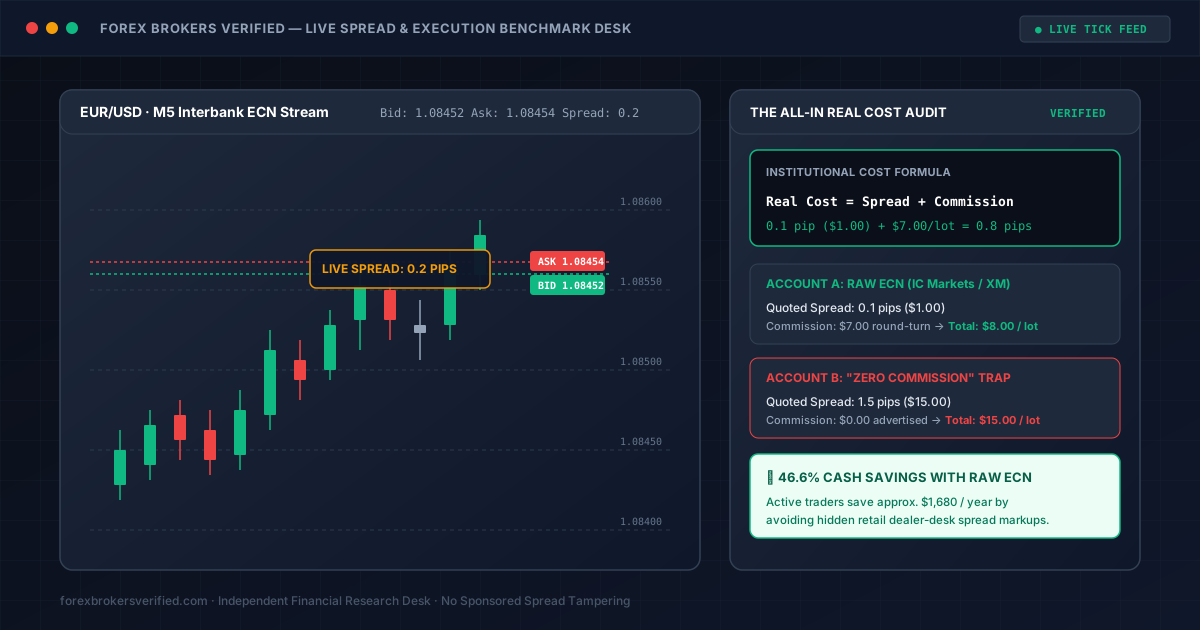
When shopping for a retail forex broker, almost every landing page flashes the exact same headline: "Raw Spreads From 0.0 Pips!" or "Zero-Commission Trading!"
To a beginner or everyday trader, these slogans sound like free trading. In reality, advertised spreads are frequently the most deceptive marketing tactic in the retail brokerage industry.
A broker boasting a "0.0 pip minimum spread" might only quote 0.0 pips for two seconds at 2:00 PM when nobody is trading, while hitting you with an $8.00 per lot commission and widening to 2.5 pips the moment you actually click Buy or Sell. Conversely, a broker advertising a modest 0.7 pip standard spread might carry zero commission, costing you significantly less over 100 trades.
If you want to protect your capital and evaluate what you are actually paying, here is the institutional methodology explained in plain English, along with a free tool you can paste into your chart to verify your broker yourself.
1. What Does "Commission Friction" Mean in Plain English?
If you are new to forex, formulas like $$\frac{$7.00}{$10.00} = 0.70\text{ pips}$$ might look like confusing financial jargon. Here is what is actually happening in simple terms:
The "Budget Airline" Analogy
Think of choosing a forex account like booking an airline ticket:
- Broker A (The "Raw ECN" Account): Advertises a super-cheap ticket for $1.00 (0.1 pip spread). But at the gate, they charge you a mandatory $7.00 baggage fee (commission). Your total out-of-pocket cost is $8.00.
- Broker B (The "Zero Commission" Standard Account): Advertises "Free Baggage! Zero Fees!" ($0 commission). But the ticket itself costs $15.00 (1.5 pip spread markup). Your total out-of-pocket cost is $15.00.
Even though Broker B claimed there were "zero fees", you paid almost double because their hidden spread markup was huge!
Where Does the $10 Number Come From?
In forex trading:
- A Standard Lot is 100,000 units of currency (e.g. €100,000 on EUR/USD).
- On any pair ending in USD (like EUR/USD or GBP/USD), 1 pip movement on 1 Standard Lot equals exactly $10.00 cash.
- If the price moves 1 pip in your favor, you make $10.
- If the price moves 1 pip against you, you lose $10.
Now, look at the fees brokers charge:
- When a broker charges $3.50 to enter a trade and $3.50 to exit a trade, they are charging you $7.00 in commission for that lot.
- Because 1 pip = $10.00, paying a $7.00 commission fee is the exact same thing as starting the trade 0.7 pips in the red ($$7.00 \div $10.00 = 0.70$ pips).
The Three Real Examples Broken Down:
- Standard ECN Broker ($3.50 per side = $7.00 round-turn):
- Commission fee = $7.00 per lot.
- That equals 0.70 pips of extra cost.
- If the live spread is 0.1 pips, your real all-in cost is: 0.1 + 0.7 = 0.8 pips ($8.00).
- Discount ECN Broker ($2.25 per side = $4.50 round-turn, e.g. Fusion Markets):
- Commission fee = $4.50 per lot.
- That equals 0.45 pips of extra cost.
- If the live spread is 0.1 pips, your real all-in cost is: 0.1 + 0.45 = 0.55 pips ($5.50).
- High-Fee Broker ($5.00 per side = $10.00 round-turn):
- Commission fee = $10.00 per lot.
- That equals a massive 1.00 pip of extra cost!
- Even if they give you a "0.0 pip spread", you are paying a full 1.0 pip ($10.00) just to enter and exit.
The Golden Takeaway: Whenever you look at a broker with a commission, take the total round-turn fee (e.g. $7.00), divide by 10, and add that number to their spread. That is your true cost!
2. Understand the Three Spread Traps
Brokers use three different definitions of spreads to fool retail traders:
| Spread Classification | What It Actually Means | Why Advertised Numbers Lie |
|---|---|---|
| Minimum Advertised Spread | The lowest spread recorded during midnight calm (e.g. "From 0.0 pips"). | May only appear for 2 seconds all day. You will almost never execute at this price. |
| Typical / Average Spread | The mathematical average spread during active trading hours. | Much better, but brokers often exclude high-volatility news events from this calculation. |
| Live Execution Spread | The real bid-ask difference at the exact second your order hits the server. | This is the only number that matters to your bank account. |
3. The 5:00 PM EST Rollover Trap (Spread Widening)
One of the biggest pitfalls for new traders is overnight rollover spread widening.
At 5:00 PM New York time (10:00 PM GMT), major international banks in New York and London close their books for the day, and Australian banks are just opening with very light volume.
During this 30-minute settlement period:
- A broker advertising 0.2 pips on EUR/USD during the day may suddenly blow out to 5.0 or 8.0 pips!
- Cross pairs like GBP/NZD or EUR/AUD can blow out to 25.0+ pips!
If you leave a trade running overnight with a 15-pip stop loss, this artificial spread spike can trigger your stop loss and close your trade at a loss, even if the actual chart never touched your price level!
Top-tier regulated brokers (such as IC Markets, Pepperstone, and XM) maintain strict liquidity safeguards during rollover, while unregulated offshore brokers intentionally let spreads explode to hunt retail stop losses.
4. Free Tool: How to Audit Your Broker's Spreads Yourself
Instead of taking any broker's word for it, you can measure their actual live spreads directly on your own trading screen using this lightweight Live Spread Auditor indicator.
It runs in the top-left corner of your chart and continuously records:
- Live Spread: What you are paying right this second.
- Average Spread: The true average over hundreds of real price updates.
- Lowest Spread: The tightest spread the broker offered.
- Widest (Spike): The widest spread recorded (especially useful to see rollover blowouts!).
Step-by-Step Instructions: How to Run the Script
You don't need any programming experience. It takes 60 seconds:
- Open MetaTrader 4 (MT4) or MetaTrader 5 (MT5) on your computer.
- On your keyboard, press
F4(or go toTools→MetaQuotes Language Editor). This opens MetaEditor. - Click the New button in the top toolbar:
- Select Custom Indicator → click Next.
- In the Name field, type:
SpreadAuditor→ click Next → click Finish.
- Select all the text in the window (
Ctrl + A) and delete it. - Copy the code block below and paste it into the empty editor window:
//+------------------------------------------------------------------+
//|                                            SpreadAuditor.mq4    |
//|                        Forex Brokers Verified Spread Auditor     |
//|                        https://www.forexbrokersverified.com      |
//+------------------------------------------------------------------+
#property copyright "Forex Brokers Verified"
#property link      "https://www.forexbrokersverified.com"
#property version   "1.00"
#property strict
#property indicator_chart_window

double minSpread = 9999.0;
double maxSpread = 0.0;
double totalSpread = 0.0;
long   tickCount = 0;

int OnInit()
{
   minSpread = 9999.0;
   maxSpread = 0.0;
   totalSpread = 0.0;
   tickCount = 0;
   Comment("Spread Auditor Initialized. Waiting for live price ticks...");
   return(INIT_SUCCEEDED);
}

int OnCalculate(const int rates_total,
                const int prev_calculated,
                const datetime &time[],
                const double &open[],
                const double &high[],
                const double &low[],
                const double &close[],
                const long &tick_volume[],
                const long &volume[],
                const int &spread[])
{
   // Calculate spread in standard pips (1 pip = 10 points on 5-digit brokers)
   double divider = (Digits == 3 || Digits == 5) ? 10.0 : 1.0;
   double currentSpread = (Ask - Bid) / (Point * divider);

   if(currentSpread < minSpread) minSpread = currentSpread;
   if(currentSpread > maxSpread) maxSpread = currentSpread;

   totalSpread += currentSpread;
   tickCount++;
   double avgSpread = totalSpread / tickCount;

   string dashboard =
      "==========================================\n" +
      "  FOREX BROKERS VERIFIED — SPREAD AUDITOR\n" +
      "==========================================\n" +
      "  Pair:            " + Symbol() + "\n" +
      "  Live Spread:     " + DoubleToString(currentSpread, 1) + " pips\n" +
      "  Average Spread:  " + DoubleToString(avgSpread, 1) + " pips (across " + IntegerToString(tickCount) + " ticks)\n" +
      "  Tightest Spread: " + DoubleToString(minSpread, 1) + " pips\n" +
      "  Widest (Spike):  " + DoubleToString(maxSpread, 1) + " pips\n" +
      "==========================================\n" +
      "  Tip: Check 'Widest (Spike)' after 5 PM EST rollover!\n" +
      "==========================================";

   Comment(dashboard);
   return(rates_total);
}

void OnDeinit(const int reason)
{
   Comment("");
}
- Click the green Compile button at the top (or press
F7). You should see0 errors, 0 warningsat the bottom. - Switch back to your MetaTrader chart window:
- Press
Ctrl + Nto open the Navigator panel on the left. - Expand Indicators, find
SpreadAuditor, and drag it directly onto your chart (e.g. EUR/USD). - Click OK.
- Press
What to Look for on Your Screen:
- Within seconds, a clean text box will appear in the top-left corner of your chart updating on every price tick.
- Leave it running for 24 hours:
- If the broker advertises an average spread of 0.8 pips, but your on-screen Average Spread reads 1.5 pips, your broker is marking up your prices.
- Check the Widest (Spike) reading the next morning. If it says 8.0 pips on EUR/USD, that broker is blowing out spreads during rollover.
5. Summary Checklist Before Depositing Funds
- Calculate All-In Costs: Add the live spread + round-turn commission ($\text{fee} \div 10$). Never assume "Zero Commission" means cheap.
- Test With Real Money ($10–$50): Demo accounts have artificial zero-delay liquidity. Open a micro account and test execution with $10 first.
- Audit Rollover Spreads: Check how wide spreads get at 5:00 PM EST before holding swing positions overnight.
- Choose Regulated ECN Venues: Prioritize brokers with Tier-1 licenses (FCA, ASIC, CySEC) that route orders to real interbank liquidity providers.
- Use Our Head-to-Head Comparison: Compare verified spreads and execution engines side-by-side using our Compare Brokers Matrix.