




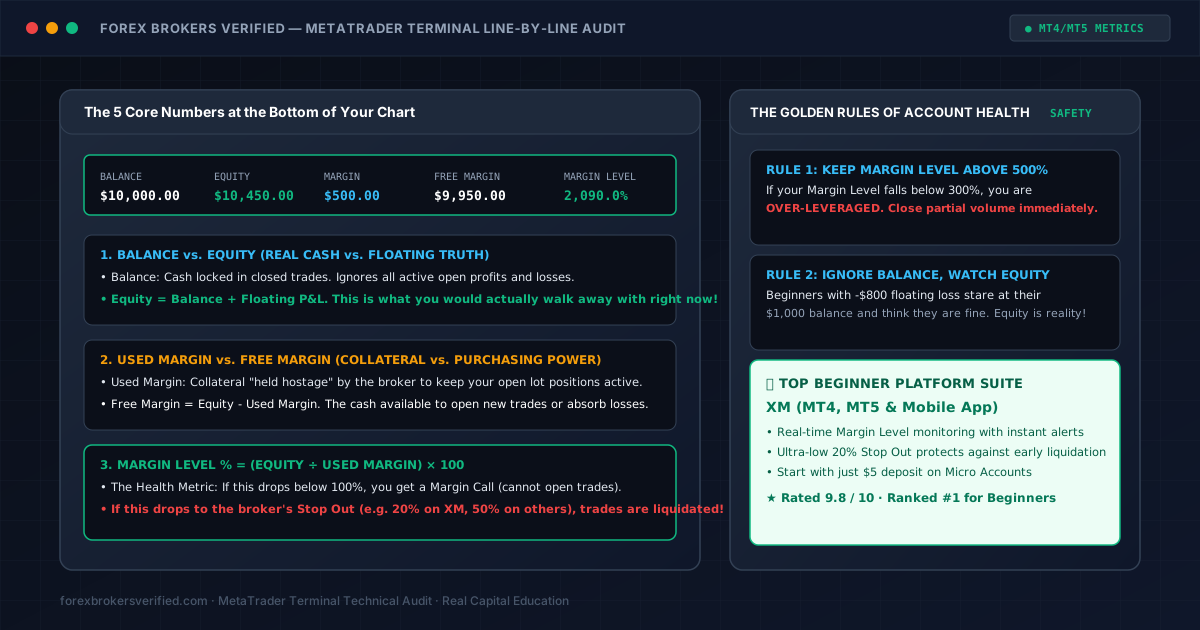
When you open MetaTrader 4 (MT4) or MetaTrader 5 (MT5) and place your first trade, a gray bar appears at the bottom of your Trade tab containing five numbers:
$$\text{Balance} \quad | \quad \text{Equity} \quad | \quad \text{Margin} \quad | \quad \text{Free Margin} \quad | \quad \text{Margin Level %}$$
To an untrained beginner, these five metrics look like repetitive banking jargon. Many beginners stare proudly at a high Balance number, completely oblivious to the fact that their Equity and Margin Level % are plummeting toward an automated account liquidation.
In professional trading, your Balance is an illusion—your Equity is reality.
Here is the line-by-line mechanical breakdown of every number on your terminal status bar, the mathematical formulas connecting them, and the golden rules of margin health you must follow to stay in the game.
1. Balance vs. Equity: The Illusion vs. The Truth
Understanding the difference between Balance and Equity is the single most important concept in trade management:
Balance (Closed Reality)
- What it is: The cash in your account from fully closed trades and settled deposits.
- What it ignores: Everything currently happening on your charts!
- If you deposit $5,000, open a position, and that trade is currently losing -$3,500, your Balance will still read $5,000.00. It will not change until you click "Close Trade."
Equity (The Live Truth)
- What it is: Your real, liquid cash value right this second if you closed all open positions:
$$\text{Equity} = \text{Balance} + \text{Floating Profits} - \text{Floating Losses}$$
- If your Balance is $5,000 and your open trade is -$3,500, your Equity is $1,500.00.
- Rule for Beginners: Never boast about your Balance. Equity is the exact amount of money you would walk away with if you shut your laptop right now.
2. Used Margin vs. Free Margin: Collateral vs. Buying Power
The next two numbers measure your risk capacity and leverage usage:
Margin (Used Margin / Collateral)
- What it is: The portion of your capital "held hostage" by your broker as a security deposit to keep your current trades open.
- The Formula: $\text{Used Margin} = \frac{\text{Trade Notional Value}}{\text{Leverage Ratio}}$
- Example: On a 1:500 leverage account, opening 1 Standard Lot ($100,000) of EUR/USD locks $200.00 in Used Margin. This money is not a fee; it is collateral returned to you when the trade closes.
Free Margin (Your Safety Buffer)
- What it is: The remaining capital available to either open new trades or absorb market drawdowns:
$$\text{Free Margin} = \text{Equity} - \text{Used Margin}$$
- If your Free Margin hits $0.00, you receive a Margin Call. You can no longer open any new positions.
3. Margin Level %: The Health Metric of Your Account
The fifth number on the right side of your terminal bar is your Margin Level percentage:
$$\text{Margin Level %} = \left(\frac{\text{Equity}}{\text{Used Margin}}\right) \times 100$$
Think of Margin Level % as the blood pressure monitor of your trading account:
| Margin Level % | Health Status | What Happens to Your Trades |
|---|---|---|
| 500% – 2000%+ | 🟢 Optimal Health | Perfectly capitalized. Ample cushion to withstand volatile news wicks. |
| 200% – 400% | 🟡 Caution Zone | Over-leveraged. Consider closing partial lot volume to free up margin. |
| 100% (or 50%) | 🟠 Margin Call | Terminal bar turns bright red. Broker blocks all new orders. |
| 20% (to 50%) | 🔴 Stop Out | Automatic Liquidation! Server forcefully closes your biggest losers. |
4. Why XM's 20% Stop Out Level Protects Beginners
Different brokers set very different liquidation thresholds:
- Many retail brokers trigger a Stop Out at 50% Margin Level.
- Our #1 verified broker, XM, sets its Stop Out at an ultra-protective 20%.
The Real-World Difference:
If you have $200 in Used Margin on a standard broker, liquidation begins when your Equity drops to $100.
On XM, liquidation does not begin until Equity drops to $40. That extra $60 of breathing room allows your positions to survive violent intraday spikes and news wicks before reversing back toward your target.
Furthermore, XM provides Guaranteed Negative Balance Protection. Even if a weekend flash crash drives your equity below zero, you can never owe money to the broker.
5. Summary Checklist for Reading Your Terminal
- Watch Equity, Not Balance: Your open trade floating P&L dictates your true financial condition.
- Never Let Margin Level Drop Below 300%: If your margin level drops below 300%, you are trading too large for your account size.
- Calculate Required Margin Before Entry: Use our free Forex Calculators to ensure your trade size matches your account capital.