




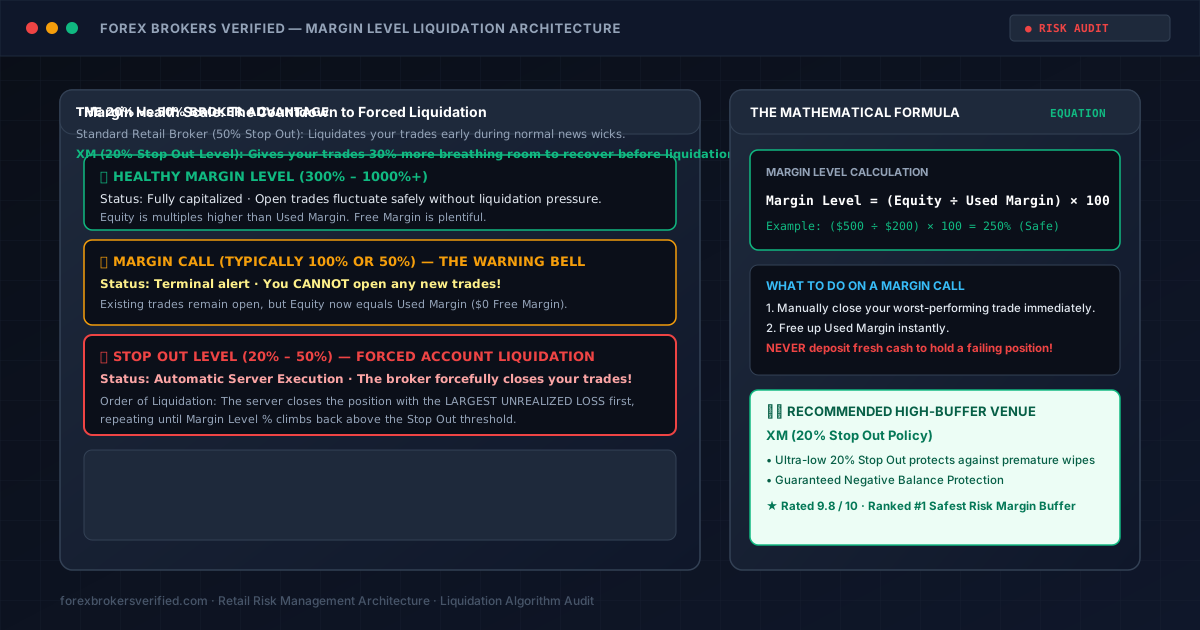
Ask most beginner forex traders the difference between a Margin Call and a Stop Out, and you will usually get a blank stare: "Aren't they the same thing? Doesn't the broker just wipe out your account?"
Confusing these two concepts is one of the most expensive mistakes a beginner can make.
A Margin Call is a warning siren; a Stop Out is an automated execution guillotine.
Understanding the mathematical relationship between your Equity, Used Margin, and your broker's specific Stop Out percentage is the exact dividing line between recovering from a temporary market drawdown or having your positions liquidated at the worst possible tick.
Here is the exact step-by-step breakdown of how liquidation algorithms function, which trade the server closes first, and why a 20% Stop Out broker provides a massive mathematical advantage over a standard 50% broker.
1. The Core Equation: What Is Margin Level %?
Before looking at liquidation, look at the single most important number on your MetaTrader terminal:
$$\text{Margin Level %} = \left(\frac{\text{Equity}}{\text{Used Margin}}\right) \times 100$$
- Equity: Your live cash balance plus or minus all floating, open profits and losses.
- Used Margin: The collateral deposit "locked" by the broker to hold your open position active.
Example Walkthrough:
- You deposit $1,000.
- You open 1 Standard Lot ($100,000) of EUR/USD with 1:500 leverage.
- Your broker locks $200 in Used Margin as collateral.
- Your initial Margin Level is: $\left(\frac{$1,000}{$200}\right) \times 100 = \mathbf{500%}$ (Very Healthy).
If the market moves against you by 40 pips ($400 loss), your Equity drops to $600. Your new Margin Level becomes: $\left(\frac{$600}{$200}\right) \times 100 = \mathbf{300%}$.
2. Margin Call: The Warning Siren (100% or 50%)
When your trade continues losing and your Margin Level drops to your broker's Margin Call threshold (most commonly 100%):
$$\text{Equity} = \text{Used Margin} \quad \longrightarrow \quad \text{Free Margin} = $0.00$$
At this exact moment:
- The Terminal Flashes Red: On MT4 and MT5, the terminal bar highlights in bright red.
- Trading Halts: You CANNOT open any new positions.
- Your Trades Remain Open: The broker does not close your positions yet. The server is warning you: "You are dangerously close to account failure. Deposit more capital or close trades manually."
3. Stop Out: The Automated Execution Guillotine (20% to 50%)
If the market continues dropping and hits the broker's Stop Out Level, the server takes control out of your hands. The broker's automated risk management engine initiates Forced Liquidation.
Which Trade Gets Closed First?
Many beginners believe the broker liquidates the trade opened first (FIFO). That is incorrect.
Under standard institutional risk algorithms:
- The server scans your open positions and identifies the single trade with the LARGEST UNREALIZED LOSS in cash.
- It forcefully closes that trade at the current market bid/ask price.
- Closing that position releases its Used Margin back into your account, immediately pushing your Margin Level % back up.
- If your Margin Level is still below the Stop Out threshold, the server closes the next largest losing trade, repeating until your account stabilizes.
4. The 20% vs. 50% Broker Advantage: Real Capital Proof
The specific Stop Out percentage set by your broker has a life-or-death impact on your open trades:
- Broker A (Standard Dealing Desk): Stop Out set at 50%.
- Broker B (XM): Stop Out set at 20%.
Let's look at the math on a $500 balance with $100 Used Margin:
- On Broker A (50% Stop Out): Liquidation triggers when Equity drops to $50 ($100 \times 50%$).
- On Broker B (XM - 20% Stop Out): Liquidation does not trigger until Equity drops to $20 ($100 \times 20%$).
Why This Matters: During high-impact news releases (such as US Non-Farm Payrolls), the market frequently spikes 30 pips against you before reversing violently in your favor. On Broker A, your trade is prematurely stopped out at the bottom of the wick. On XM, that extra 30% margin buffer allows your trade to survive the temporary spike and ride the subsequent reversal into profit!
Furthermore, XM provides Guaranteed Negative Balance Protection. Even if a sudden weekend gap pushes your balance below zero, your account is reset to $0.00 automatically—you never owe money to the broker.
5. What to Do If You Receive a Margin Call
If your MetaTrader terminal flashes red with a Margin Call alert:
- DO NOT Deposit Fresh Money to "Save" a Trade: Adding capital to a runaway losing position is the #1 reason retail accounts get completely wiped out.
- Manually Cut Your Worst Trade: Closing your biggest losing position immediately frees up collateral, raising your Margin Level back into safe territory.
- Use Stop Losses on Every Entry: A stop loss prevents your margin level from ever approaching the Stop Out boundary.
- Size Your Lots Correctly: Use our free Position Size Calculator to verify that your trade never risks more than 1% to 2% of your equity.